Real Estate Video Marketing in 2026: A Practical Plan for Agents
Plan a manageable listing video campaign: choose a purpose, build a 30-second story, adapt it for each channel, and measure useful responses.
por Rex HanOriginally published on ActiveRain
A listing video should help someone understand the property and know what to do next. That gives you a useful starting point for deciding what to film, which photos to use, and where to share the finished edit.
For a manageable video-marketing plan in 2026, I would start with one listing, a few clear video ideas, and a simple way to track the response.
Here is a practical workflow, with links to real examples and official resources you can use along the way.
1. Give each video one job
Choose the purpose before opening an editor. Three useful starting points are:
- Listing introduction: Show the property's strongest features and invite viewers to explore the full listing.
- Feature spotlight: Explain one detail, such as the connection between the kitchen and dining space, a covered patio, or a separate home office.
- Open house invitation: Show enough of the property to give people a reason to attend, then clearly display the verified date, time, and location.
An agent answering a common seller question can be a separate video. Giving each piece a clear purpose makes the message easier to write and the result easier to evaluate.
For example, a feature spotlight might open with: “A covered patio directly off the main living space—here is how they connect.” Use a detail that is true of the property you are presenting.
2. Build a clear 30-second story
A 30-second edit is a practical starting point to test. It is a suggested structure, not a universal ideal length or a platform requirement.
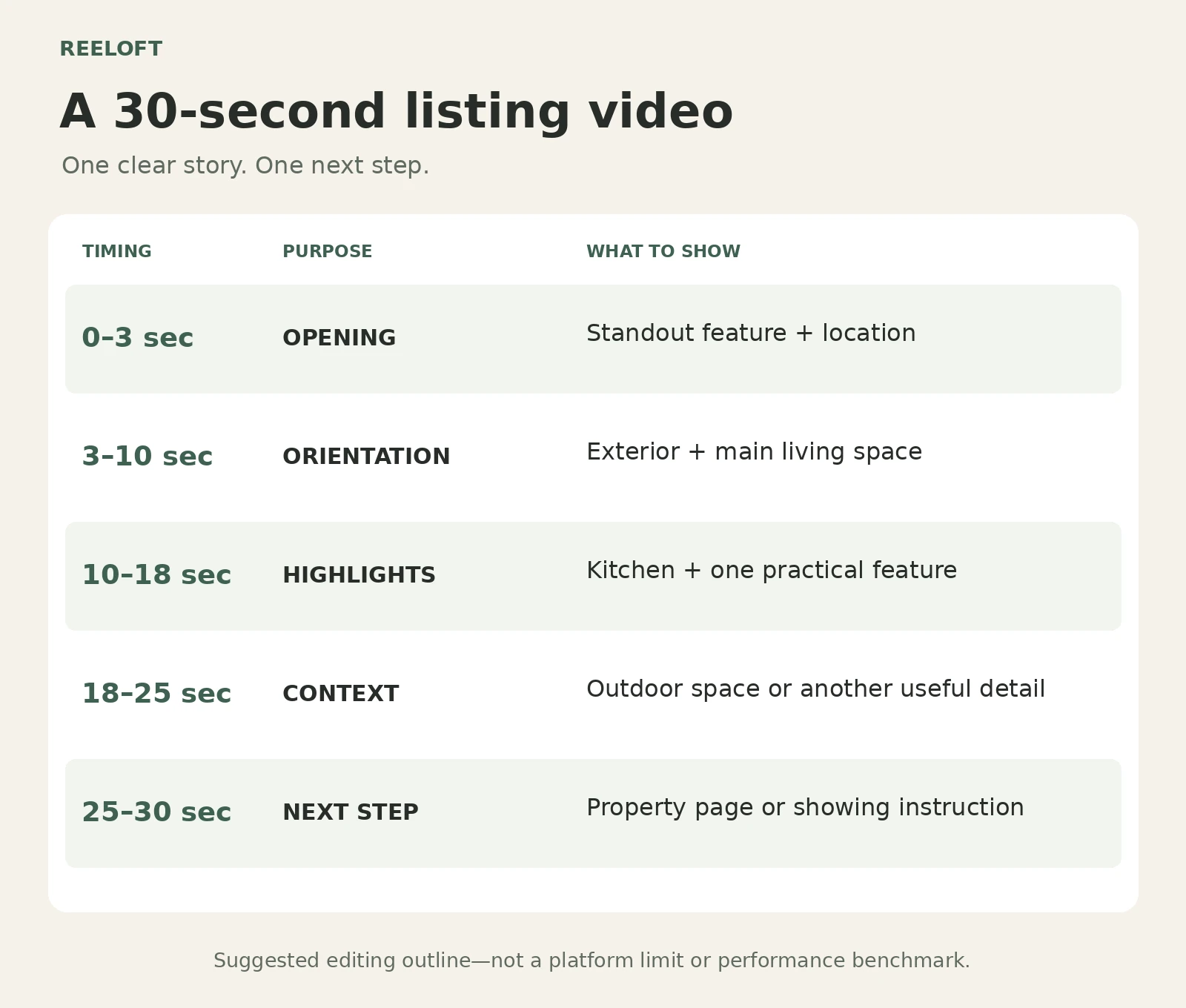
- 0–3 seconds: Open with a distinctive feature and identify the location.
- 3–10 seconds: Introduce the exterior and main living space.
- 10–18 seconds: Show the kitchen and one other practical feature.
- 18–25 seconds: Add useful context, such as the outdoor space or another room.
- 25–30 seconds: Give one clear next step, such as viewing the full listing or requesting a showing.
Keep on-screen text brief and readable. If narration carries important details, add accurate captions. Watch the finished video without sound to check whether the property and next step still make sense.
3. Choose a production method that fits the message
Filmed walkthroughs are useful when you need to show how spaces physically connect. Agent-led video lets you explain a detail in your own voice. A video assembled from approved property photos can provide a repeatable way to create listing overviews and feature clips.
As the founder of Reeloft, I work on that photo-to-video workflow: turning approved listing photos or supported property links into editable videos with motion, audio, text, and branding.
For concrete examples, watch the complete city view apartment tour and duplex apartment walkthrough. These videos show room sequences and camera movement across a full property edit.
For any AI-assisted edit, review doors, windows, room proportions, furniture, and views against the source material. Describe the finished asset accurately. A sequence created from still photos should not be presented as footage of a continuous walk through the home.
4. Adapt the video and the next step to the channel
For an initial campaign, I would prepare a vertical version for short-form social viewing and a landscape version for a property page or presentation. Check each crop: the feature that makes a wide image useful can disappear in a narrow frame.
Instagram Reels, Facebook, TikTok, and YouTube Shorts are possible distribution channels. Start with the places where you already have relevant contacts or an audience, then expand based on the response and the time required.
For YouTube specifically, square or vertical uploads of up to three minutes can qualify as Shorts under its current guidance. You can use that room for an explanation when it is useful; every listing video does not need to reach the limit. YouTube's official Shorts guidance.
Check whether the route you mention is actually clickable. YouTube says URLs in Shorts descriptions and comments are not clickable, while channel profile links are. If the next step is a property page, point viewers to a working profile link and test that route yourself. YouTube's link-placement guide.
On a property page, place the video near the photos, useful listing details, and a clear contact option. In a seller update, share the finished video and where it was published.
5. Choose music for the intended use
Music selection belongs in the publishing workflow. Before reusing an edit across several platforms, check the track's terms for those destinations and for any paid advertising you plan to run.
TikTok directs businesses to its Commercial Music Library for commercial TikTok content. For YouTube, its Audio Library guidance explains the available music and when attribution is required.
Keep a clean version of the edit without platform-specific music so you can prepare another version when needed. Keep narration clear enough to understand over the soundtrack.
6. Track the response beyond the view count
Decide what a useful result looks like for each video:
- A listing introduction: visits to the property page and relevant inquiries.
- A feature spotlight: questions about that feature or requests for more details.
- An open house invitation: questions about attending and reported attendance sources.
For links to a website you measure with Google Analytics, campaign parameters can help identify referred traffic. Google's campaign-tracking guide explains the fields, and its Campaign URL Builder helps create the links.
Keep the property, channel, video version, publication date, and inquiry results in a simple record. Tagged links help with website attribution, but conversations, phone calls, and showing requests also need to be recorded. Ask new inquiries how they found the property.
Compare the time spent creating and distributing a video with the quality of the response. A view count by itself cannot tell you whether someone is a serious prospective buyer.
7. Make the next listing easier
Try a small sequence for one listing:
- Monday: Publish the listing introduction.
- Wednesday: Share a feature spotlight with a different opening.
- Friday: Answer a real question about the property, or publish an open house invitation if one is scheduled.
This is a sample routine, not a claim about the best posting days. Prepare reusable text styles and branding, but review the facts, crops, captions, links, and next step for every property.
At the end of the week, note which video started useful conversations and what you would change. That record gives you a practical basis for the next campaign.
Which video would be most useful for your next listing: a property overview, a feature spotlight, or an agent-led explanation?
Platform resources checked September 17, 2026. Suggested timings and publishing schedules are editorial starting points, not performance guarantees.
Put your listing photos to work
Start with approved property photos or a supported listing link, then review and edit your video in Reeloft.